The motherboard is the central hub of any electronic device, connecting processors, memory, storage, and peripheral components. When it fails, the device often becomes completely inoperative, creating frustration and potential data loss. Identifying the best repair phone shop that can accurately diagnose and fix motherboard issues is critical for restoring full functionality and extending the life of your device. Skilled technicians approach each repair with precision, ensuring hardware and software integrity while preventing further damage.
1. Recognizing Symptoms of Motherboard Damage
Motherboard issues often show subtle signs before complete failure. Recognizing them can help users seek timely repairs and avoid costly replacements.
- Unexpected Shutdowns or Restarts
Devices that power off or restart without warning are a common indicator of motherboard faults. Random shutdowns may affect multiple applications or prevent the system from booting properly. Catching these signs early allows technicians to intervene before the issue cascades to other components, potentially saving the device from total failure.
- Overheating Beyond Normal Levels
Excessive heat from the CPU, GPU, or surrounding circuits can signal damaged pathways or failing power delivery components. Persistent overheating can shorten the lifespan of critical chips, leading to performance drops or sudden shutdowns. Timely detection and repair of overheating problems ensure the device operates safely and efficiently.
- Connectivity and Peripheral Failures
Problems with charging ports, USB connections, or wireless modules often trace back to motherboard malfunctions. If left unaddressed, these issues can disrupt communication between components and compromise device functionality. Recognizing early connectivity failures enables precise diagnostics and targeted repair work.
2. Thorough Diagnostic Processes to Identify Faults
A precise evaluation is the first step in motherboard repair. Technicians use visual inspections, electrical testing, and software analysis to locate faults without causing additional damage.
- Visual Inspection for Physical Damage
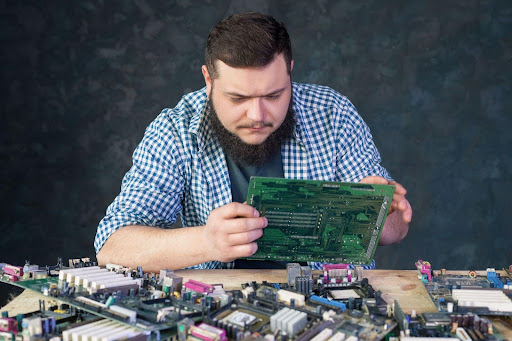
Technicians examine the motherboard for burn marks, corrosion, or swollen capacitors. Physical damage often reveals the source of failure and informs repair strategy. By identifying visible signs first, repair specialists can plan precise interventions, reducing the risk of unnecessary component replacements or further damage.
- Electrical Testing of Circuit Continuity
Using multimeters and specialized testers, technicians measure the current flow across the board to determine which circuits are compromised. This method ensures faulty pathways are accurately identified. Proper electrical testing avoids guesswork and protects unaffected areas, providing a safer and more reliable repair outcome.
- Software-Level Analysis
Firmware and BIOS checks help detect logical failures that may result from motherboard damage. By analysing software-level communication between components, technicians can ensure both hardware and system-level issues are addressed. This comprehensive approach restores full device functionality.
3. Component-Level Repairs for Maximum Precision
Motherboards contain thousands of delicate components. Precision repairs focus on fixing or replacing only the damaged parts, preserving the rest of the system.
- Capacitor and Resistor Replacement
Capacitors and resistors regulate power flow and signal integrity across the motherboard. When they fail, voltage fluctuations or signal loss may occur, impacting performance. Replacing these components restores stability, prevents recurring issues, and ensures the device operates reliably for the long term.
- Chip-Level Repairs
Critical chips like processors, memory modules, and controllers may require delicate reflowing or soldering. Skilled technicians handle these repairs carefully to avoid additional damage, restoring the core functionality of the motherboard. Proper chip-level work can bring a seemingly dead device back to life.
- Connector and Port Restoration
Charging and peripheral ports often degrade from repeated use or exposure to stress. Repairing or replacing these connectors ensures smooth power delivery and data transfer. This approach avoids full motherboard replacement while restoring device usability.
4. Data Protection During Motherboard Repair
Motherboard failures often threaten sensitive or irreplaceable data. Professional repair techniques minimise the risk of permanent loss.
- Backing Up Accessible Data
Before starting repairs, technicians back up all recoverable data. This step safeguards critical documents, photos, and application files, reducing the chance of permanent loss. It also ensures customers can continue working or accessing files with minimal disruption.
- Using Safe Repair Methods
High-precision tools and controlled techniques prevent accidental short circuits or damage to storage chips. Safe handling during repairs is essential for maintaining both hardware integrity and the accessibility of stored information.
- Post-Repair Verification
After repairs, data integrity is checked thoroughly. Files are reviewed for readability and completeness, confirming that restoration efforts have not compromised valuable information. This verification builds customer confidence in the repair process.
5. Firmware and System Calibration
Even after physical repair, the motherboard may require firmware calibration for full compatibility with other components.
- BIOS and Firmware Updates
Updating or reinstalling BIOS and firmware resolves inconsistencies caused by failures or prior repairs. Correct firmware ensures the system communicates effectively with all components, preventing future crashes or instability.
- Calibration of Critical Components
Voltage regulators, sensors, and processing units may require fine-tuning to ensure optimal performance. Proper calibration improves efficiency and extends the lifespan of internal components.
- Testing Communication Between Components
Technicians verify that all chips, connectors, and modules interact correctly. This step prevents intermittent errors and ensures the repaired device functions as intended under normal operating conditions.
6. Comprehensive Testing After Repairs
Testing under realistic usage conditions ensures the device performs reliably after restoration.
- Power and Charging Tests
Battery performance and power stability are verified to prevent unexpected shutdowns or electrical issues. These tests confirm that the repair supports long-term operation.
- Functionality Tests for Input/Output Systems
Buttons, keyboards, cameras, and ports are thoroughly tested. This ensures smooth communication between components and restores full device usability.
- Stress Tests and Performance Monitoring
Devices are subjected to simulated heavy usage to detect potential weaknesses. Monitoring ensures repaired motherboards can handle real-world demands without failing unexpectedly.
Conclusion
Motherboard issues demand precise handling, skilled component repair, and careful attention to both hardware and firmware. From thorough diagnostics and component-level restoration to post-repair testing and preventive guidance, every step ensures the device operates reliably. For professional support, NZ Electronics Repair provides expert repair centre services in Auckland, combining technical expertise with advanced tools and a customer-focused approach. Their team restores devices safely, protects sensitive data, and delivers long-lasting solutions that keep phones and laptops performing at their best for years.